


A self-hosted dashboard for Renovate Bot
How to use Krabbx to track dependency freshness and open update PRs across your GitHub organization
Why do we need it?
Every modern project depends on dozens of libraries, and keeping them up to date is a security and stability concern. Renovate Bot automates this by opening PRs when new versions are available. GitHub offers its own Dependabot, but Renovate supports a wider range of package managers, allows grouping updates into a single PR, provides fine-grained automerge rules, and works identically on any Git platform, not just GitHub. Renovate also integrates naturally with AI-assisted workflows: its custom managers and post-upgrade commands let you plug in AI tools to auto-fix breaking changes or generate migration code, while Dependabot’s Copilot Autofix is limited to security patches. Once you adopt Renovate across an entire GitHub organization, though, new questions arise: Which repos actually run Renovate? How many update PRs are piling up? Which dependencies are the most outdated?
GitHub provides no aggregated view of PRs activity. You have to open each repository, check if a config file exists, browse open PRs, and mentally piece together the state of all your dependencies. With 10 repos it’s tedious; with 50+ it’s not manageable.
Bottom line: no central dashboard for Renovate adoption, no cross-repo dependency view, no health score that tells you where your technical debt is accumulating.
Finding a solution: Krabbx
Krabbx is an open-source, self-hosted dashboard that monitors Renovate Bot adoption and dependency update activity across GitHub organizations. It scans your repositories via the GitHub API, detects whether Renovate is configured (config files, workflow YAML, or PR evidence), parses open Renovate PRs to extract dependency data, and presents everything in a single interface with real-time updates.
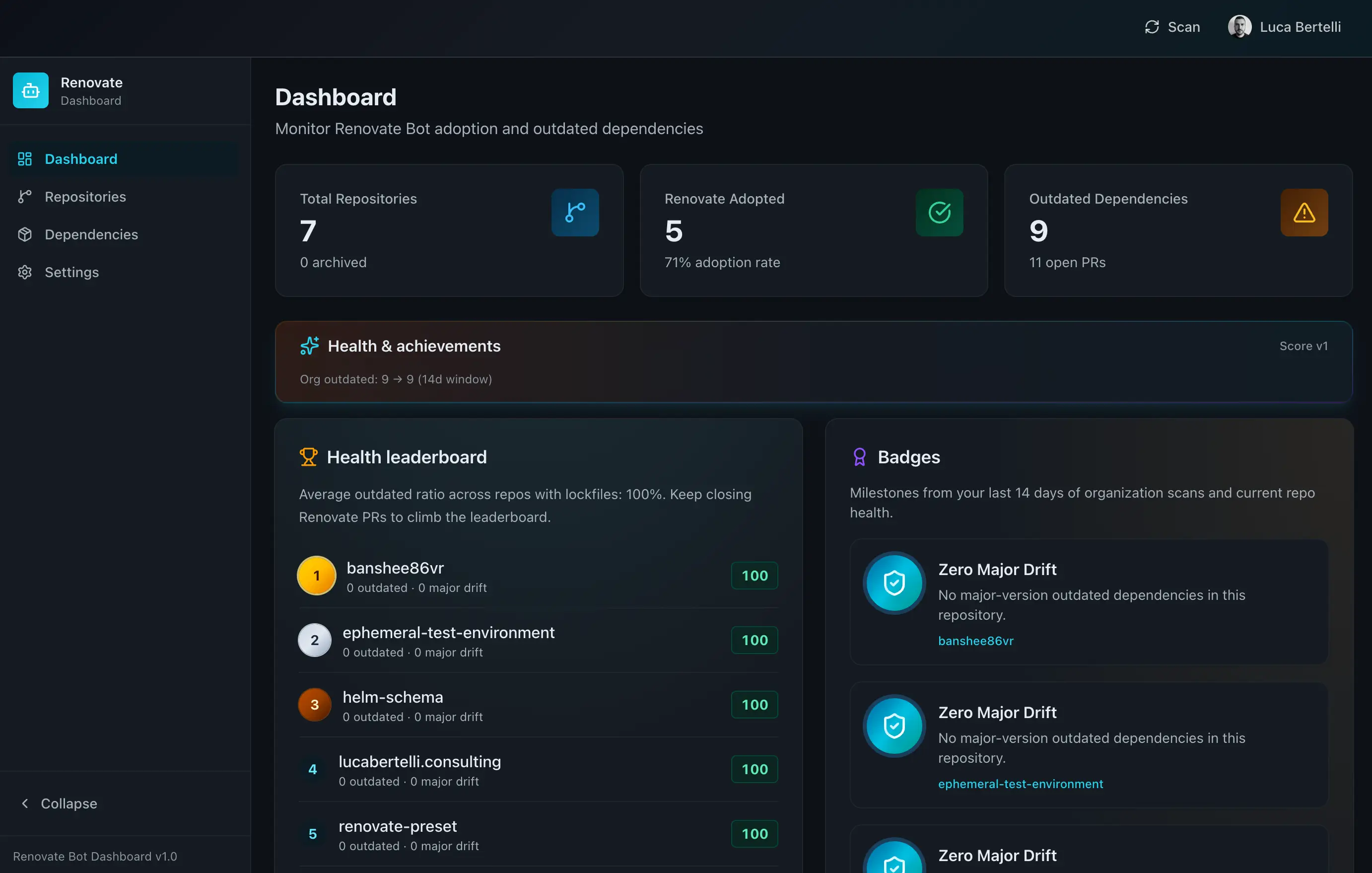 Main dashboard: total repositories, adoption rate, outdated dependencies, health leaderboard, and badges.
What does the dashboard give you?
The Dashboard page shows three summary cards at the top: total repositories, Renovate adoption rate, and total outdated dependencies with the count of open PRs. Below these, a Health & achievements section displays the organization-wide outdated trend over a 14-day window.
The Health leaderboard ranks repositories by a 0-100 health score based on three axes: freshness (ratio of outdated dependencies), major discipline (penalty for major-version drift), and PR remediation (bonus for having active Renovate PRs). Badges highlight milestones like “Zero Major Drift” for repos with no major-version outdated packages.
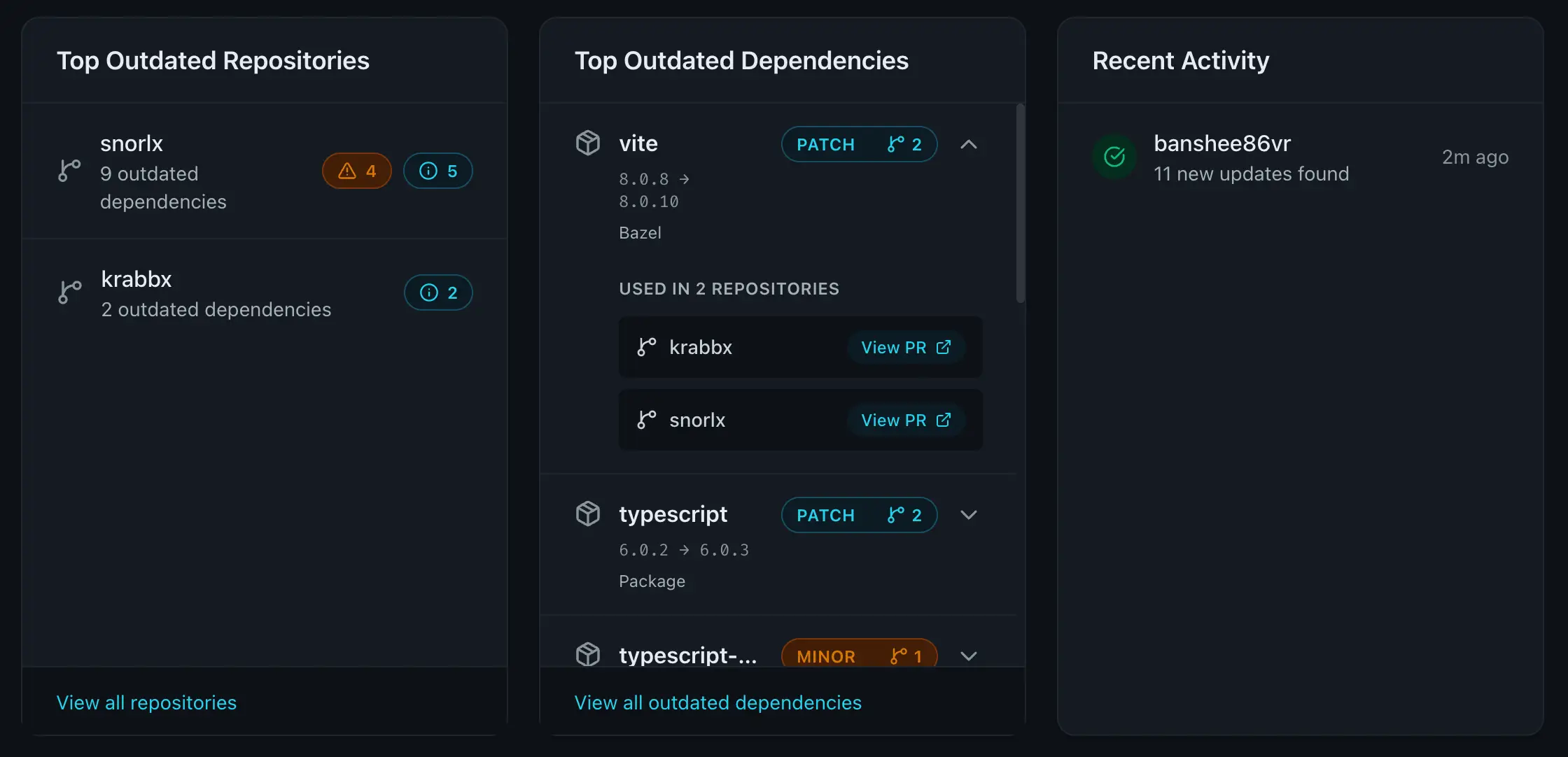 Bottom cards: top outdated repos and top outdated dependencies with cross-repo usage
Three additional cards show the top outdated repositories and the top outdated dependencies (with links to the Renovate PRs in every repo that uses them), and recent activity.
The Repositories page lists all synced repositories with their adoption status (“Adopted” or “Not adopted”), health score, open PRs count, dependency count, last scan time, and contributors.
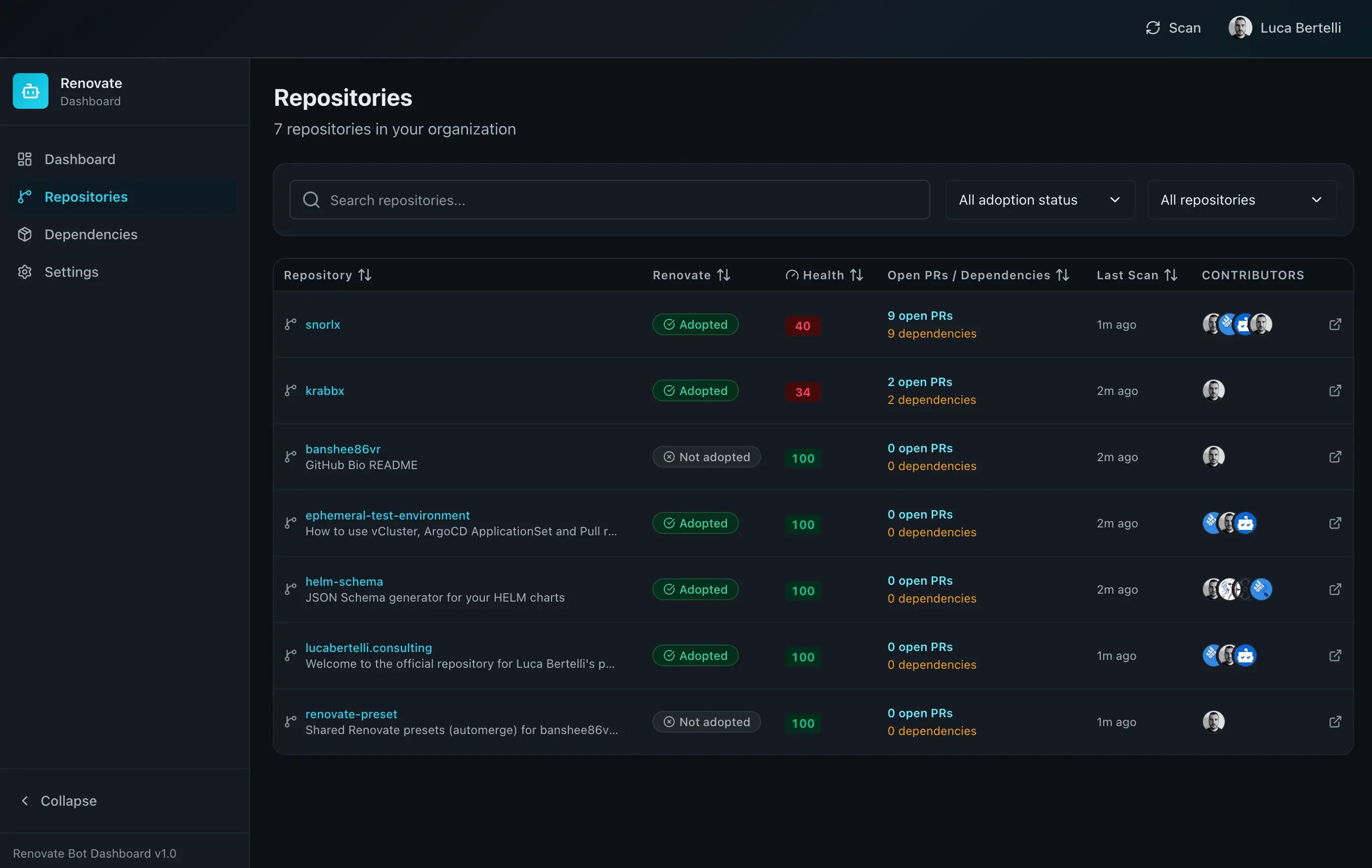 Repository list: filter by adoption status, sort by health score, and jump into any repo’s detail page.
From here you can deep dive into a Repository Detail page. This view shows the dependency health score with a radar chart for the three scoring axes, a breakdown of how the score is calculated, the org rank, and a table of all open Renovate PRs with package name, current version, latest version, and update type (patch, minor, major).
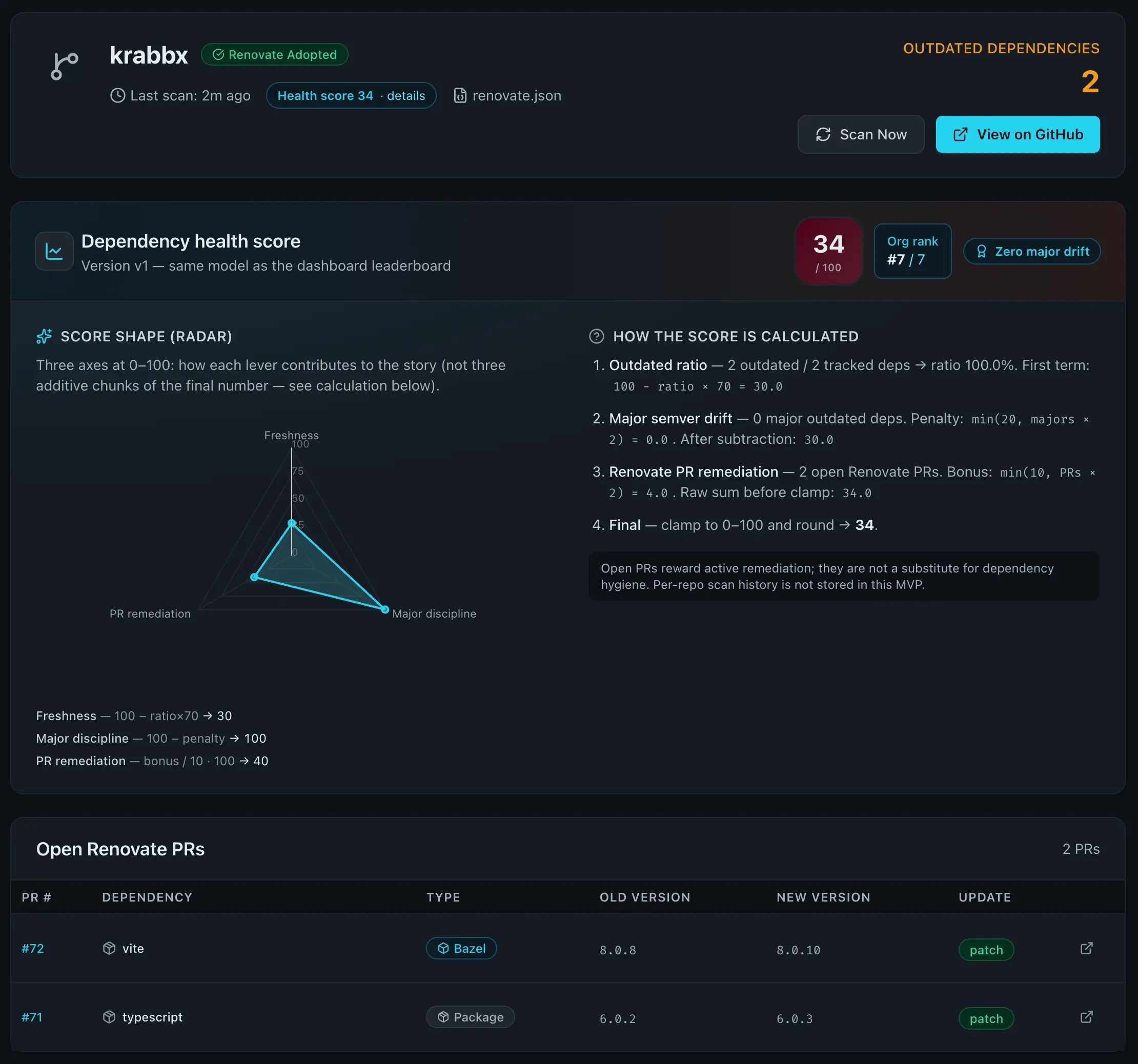 Repository detail: health score with transparent calculation, radar chart, and the list of open Renovate PRs.
The Dependencies page is a global, filterable view of all tracked dependencies across the organization. You can filter by outdated-only, search by package name, and filter by update type. Each row shows the repository, package manager type, current and latest versions, and a direct link to the Renovate PR on GitHub.
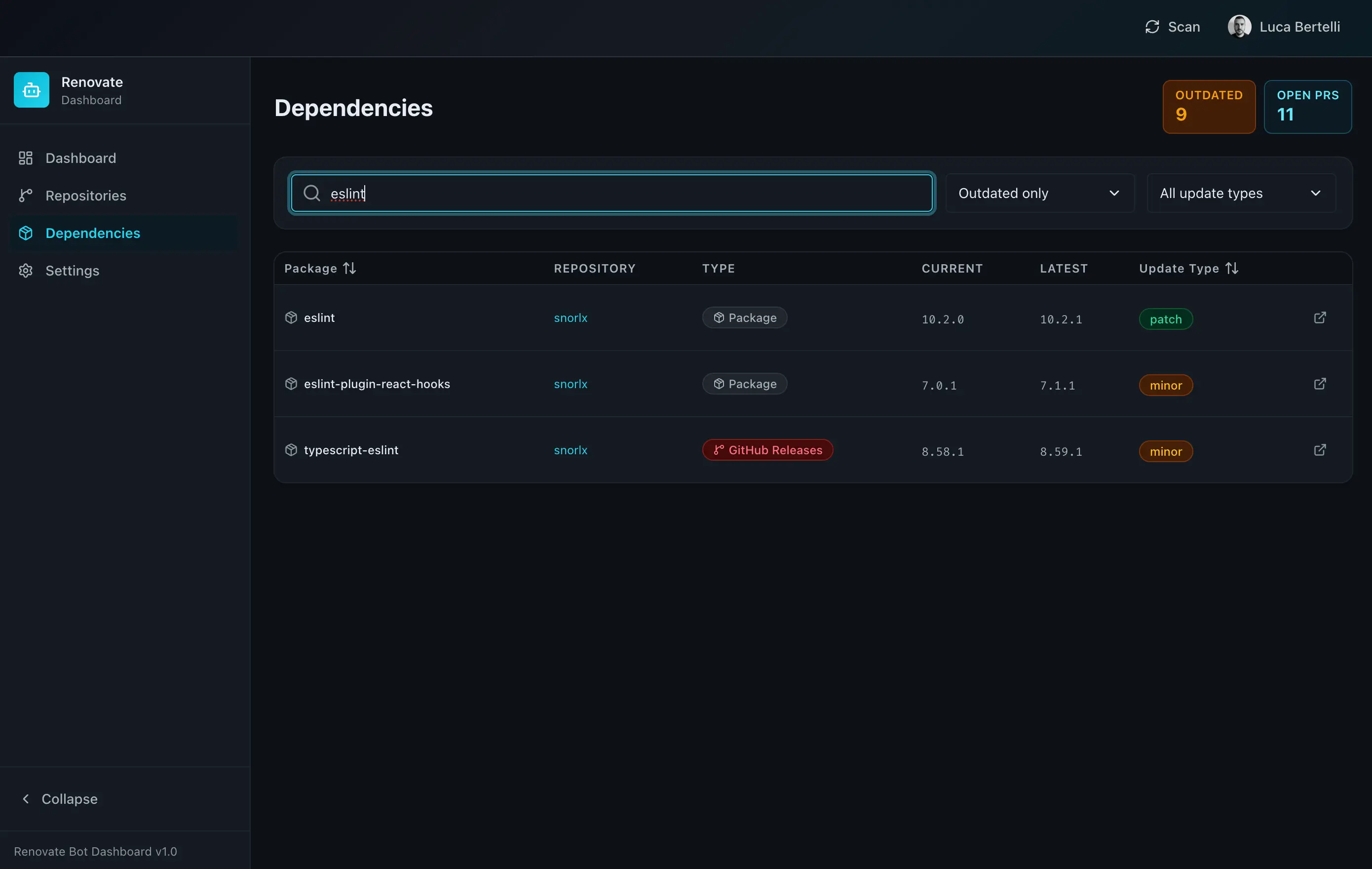 Dependencies page: search across all organization dependencies, filter by outdated status and update type.
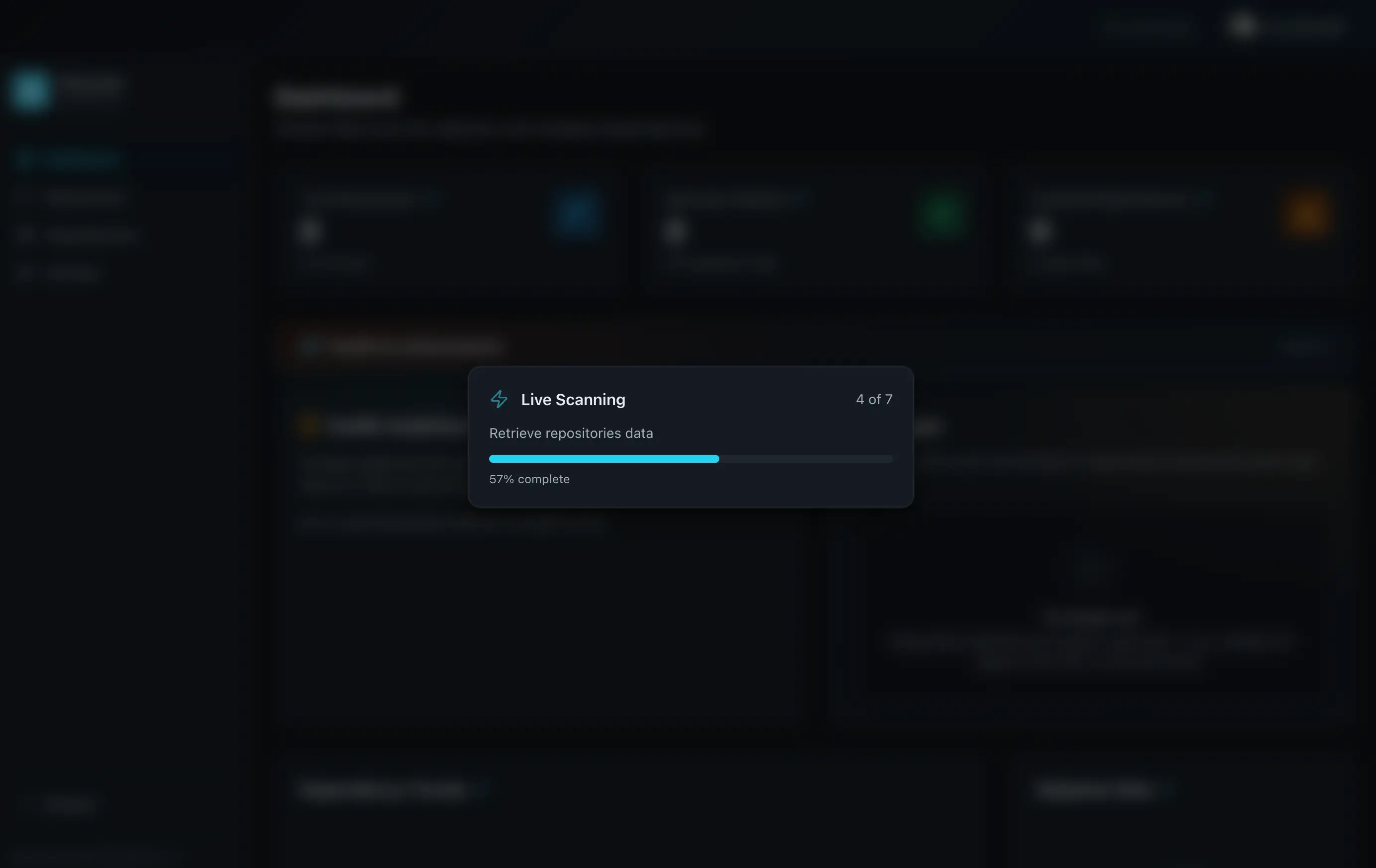
Live scanning runs in the background with real-time progress. A modal overlay shows the current scan status (e.g., “4 of 7 repositories”) with a progress bar, so you always know where the scan stands.
Requirements
- Node.js 24+
- pnpm
- A GitHub Personal Access Token with
reposcope (create one here) - (Optional) PostgreSQL for persistent storage
- (Optional) Redis for session management and Socket.IO scaling
Preparation steps
1. Clone the repository and install dependencies
git clone https://github.com/banshee86vr/krabbx.git
cd krabbx
pnpm install
2. Configure the environment
cp .env.example .envEdit .env with your settings:
# GitHub scanner
GITHUB_TOKEN=ghp_your_personal_access_token
GITHUB_TARGETS=your-org,your-username

# Auth (disable for local demo)
AUTH_ENABLED=false
ALLOW_INSECURE_NOAUTH=true

# Storage: memory for quick start, database for persistence
STORAGE_MODE=memory

# Session
SESSION_SECRET=your_random_32_character_secret_string
GITHUB_TARGETS accepts a comma-separated list of GitHub organization or user names. Every repository under those owners will be scanned.
3. Start the application
pnpm run devThe frontend starts at http://localhost:5173 and the backend API at http://localhost:3001. Click Scan in the top bar and the dashboard will begin scanning your repositories, detecting Renovate configurations, and parsing open PRs.
4. (Optional) Enable database mode for persistent storage
For data that survives restarts, spin up a PostgreSQL instance:
docker run --name krabbx-postgres \
  -e POSTGRES_DB=krabbx \
  -e POSTGRES_USER=postgres \
  -e POSTGRES_PASSWORD=postgres \
  -p 5432:5432 -d postgres:18
Update your .env:
STORAGE_MODE=database
DATABASE_URL=postgresql://postgres:postgres@localhost:5432/krabbx?sslmode=disable
Run the Prisma migrations and restart:
pnpm run db:generate
pnpm run db:migrate
pnpm run dev
5. (Optional) Enable GitHub OAuth for multi-user access
For team environments, create a GitHub OAuth App at GitHub Developer Settings:
- Application name:
Krabbx Dashboard - Homepage URL:
http://localhost:5173 - Authorization callback URL:
http://localhost:3001/api/auth/callback
Then update .env:
AUTH_ENABLED=true
ALLOW_INSECURE_NOAUTH=false
GITHUB_AUTH_CLIENT_ID=your_oauth_client_id
GITHUB_AUTH_CLIENT_SECRET=your_oauth_client_secret
You can optionally restrict access to a specific GitHub team with GITHUB_AUTH_TEAM_SLUG.
Architecture (in short)
Frontend: React 19 + TypeScript with Vite, Tailwind, TanStack Query, and Recharts. Backend: Node.js with Express 5 and TypeScript, Prisma ORM, and Socket.IO for real-time updates. Storage has two modes: STORAGE_MODE=memory for development (in-process Maps, zero setup), STORAGE_MODE=database for production with PostgreSQL. Sessions and Socket.IO can optionally scale via Redis.
The scanning engine uses the GitHub API (Octokit) to detect Renovate adoption through three options: config file presence (renovate.json, .renovaterc, etc.), workflow YAML markers (Renovate GitHub Action, Mend actions, Docker images), and PR evidence (open or recently closed PRs from the Renovate bot). Dependency data is extracted by parsing Renovate PR titles and bodies.
Docker Compose
The quickest way to run the full stack in production mode:
cp .env.example .env
# edit .env with your GitHub token and targets
pnpm run docker:up
This starts PostgreSQL, Redis, the backend, a Prisma migration job, and an nginx-fronted frontend. Services are available at http://localhost:5173 (frontend) and http://localhost:3001 (API).
pnpm run docker:down # stop the stackDeploying to Kubernetes
Krabbx ships with a Helm chart under helm/renovate-dashboard/ that provisions separate backend and frontend deployments, optional PostgreSQL and Redis StatefulSets, Ingress with path-based routing (/, /api, /socket.io), a migration Job, and non-root security contexts. Production values include autoscaling, TLS with cert-manager, network policies, and PodDisruptionBudgets.
helm install krabbx ./helm/renovate-dashboard \
  --set backend.github.token=your_token \
  --set backend.github.targets="your-org" \
  --set backend.session.secret=your_session_secret
Bottom line
With pnpm run dev you get a dashboard that scans your GitHub organization, detects Renovate adoption, tracks every outdated dependency, scores each repository on a 0-100 scale, and updates in real time. Start in memory mode to try it in minutes, then switch to PostgreSQL when you need persistence. For anyone running Renovate across multiple repositories, Krabbx is the centralized view that GitHub doesn’t provide.
Tags